


Search Here
Table of Contents |
OverviewYour chair knows you better than you think. It witnesses your morning energy, afternoon slumps, deadline marathons, and those moments when you lean back to gather your thoughts. Yet most of us accept whatever position our chair offers, adjusting ourselves instead of adjusting the chair. This guide walks you through the five essential adjustments that transform any ergonomic office chair from a passive seat into an active partner in your daily wellbeing, showing you exactly how to harness each feature for better comfort, focus, and long-term health. |
Your 3 pm shoulder ache has become as predictable as your afternoon tea. That nagging lower back tension arrives right on schedule during quarterly reviews. Sound familiar? You're experiencing what happens when your body adapts to your chair instead of your chair adapting to you. Most professionals spend 8-12 hours at their desks, yet we rarely pause to consider how our seating shapes our daily experience.
The difference between surviving and thriving through your workday often comes down to five simple adjustments. These aren't complex biomechanical theories, they're practical tweaks that honour how your body naturally wants to move and rest. Understanding these adjustments translates to the difference between dragging yourself home with aches and finishing your day with energy to spare.
The right ergonomic chair adjustments turn everyday seating into personalised support, setting the stage for deeper ergonomic understanding.
An ergonomic office chair loaded with features means nothing if those features aren't adjusted to support your unique body. Think of it like wearing expensive running shoes in the wrong size: the quality is there, but the benefit is lost. Ergonomics means fitting the job to the person, not forcing people to fit predetermined positions.
Your workspace neighbour might swear by their chair settings, but what works for their 5'10" frame won't necessarily support your 5'4" build. This personalisation extends beyond height. Everything including your posture habits, desk setup, screen position, and even your typical tasks influence which adjustments matter most. A graphic designer leaning forward to examine details needs different support than an HR manager spending hours on video calls.
Poor chair adjustment quietly drains your energy and focus. When your feet dangle or your back lacks support, your muscles work overtime to maintain balance. This constant micro-strain accumulates, and what starts as mild discomfort at 10 am becomes a throbbing ache by evening.
Studies show that improper posture is a leading cause of back pain among office workers, affecting productivity and quality of life. Beyond immediate discomfort, poor seating habits compound over months and years. That forward head position strains your neck. Unsupported arms create shoulder tension. Legs pressed against seat edges restrict circulation. These issues don't announce themselves dramatically, but they build slowly, stealing comfort one uncomfortable day at a time.
Your chair’s height is where good ergonomics truly begins: get this right, and every other adjustment falls naturally into place.
Seat height forms the foundation of ergonomic sitting. When properly adjusted, your feet rest flat on the floor while your knees bend at approximately 90 degrees. This position allows your weight to distribute evenly, preventing pressure points and supporting natural circulation.
Use these steps to adjust your seat height:
Stand beside your chair: Raise or lower the seat until the top of the cushion is roughly level with your knees.
Sit back fully in the chair: Make sure your hips are all the way back against the backrest, not perched on the edge, especially if you are sitting on your office chair.
Check your leg position: Your feet should rest flat on the floor, with your thighs running parallel to the ground and a comfortable 90-degree angle at both hips and knees.
Fine-tune for comfort: If your feet don’t reach the floor, slightly lower the seat (or use a footrest). If your knees are higher than your hips, raise the seat a little.
Align your elbows with the desk: With your shoulders relaxed and arms by your sides, bend your elbows to about 90 degrees. Adjust the seat height so your elbows are level with, or just slightly above, the desk surface. This helps prevent shoulder and neck strain while typing.
|
What if Your Feet Don't Touch the Floor? If adjusting your chair for proper desk height leaves your feet dangling, don’t lower the chair and compromise your posture use a footrest instead. It supports your legs, keeps your hips and knees at the right angle, and works for everyone, not just shorter individuals. |
Your spine naturally curves inward at the lower back, a shape called lordosis. Good lumbar support maintains this curve, preventing the slumping that causes pain. The most prominent part of lumbar support should nestle into your lower back curve, typically at waist level.
Many people position lumbar support too high or too low, missing the sweet spot entirely. To find yours, sit back in your chair and run your hand along your spine. Feel where it curves inward most dramatically? That's where support should focus. Proper lumbar positioning helps maintain spinal alignment, reducing strain on frequently injured vertebrae.
|
Design Insight: The Personal Nature of Back Support Your lumbar curve is as unique as your fingerprint. Some spines curve dramatically, others gently. Height, posture habits, and even past injuries influence your support needs. This is why adjustable lumbar support matters; it adapts to your body's story. |
Modern ergonomic office chairs offer various lumbar mechanisms. Some provide height adjustment, others depth. The best systems combine both, allowing precise customisation. During your workday, your support needs might change, sitting upright for video calls versus leaning back for reading requires different positioning.
Don't set and forget your lumbar support. As you shift between tasks, minor adjustments maintain optimal comfort. Morning stiffness might need firmer support, while afternoon flexibility could benefit from gentler positioning. Listen to your body's feedback and adjust accordingly.
Well-set armrests don’t just support your arms, they stabilise your posture, reduce tension, and keep your shoulders relaxed through long hours.
Armrests support your upper body and help prevent strain but only when they’re set at the right height. Your forearms should rest parallel to the ground, with the armrests carrying their weight without lifting your shoulders. Many people position armrests too high, causing constant tension, whereas others avoid using them altogether and miss out on crucial support.
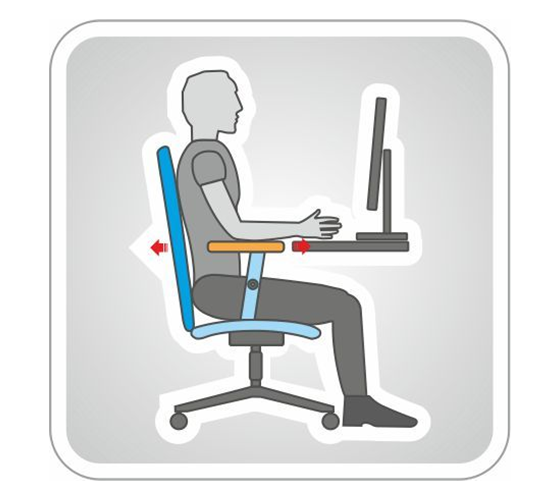
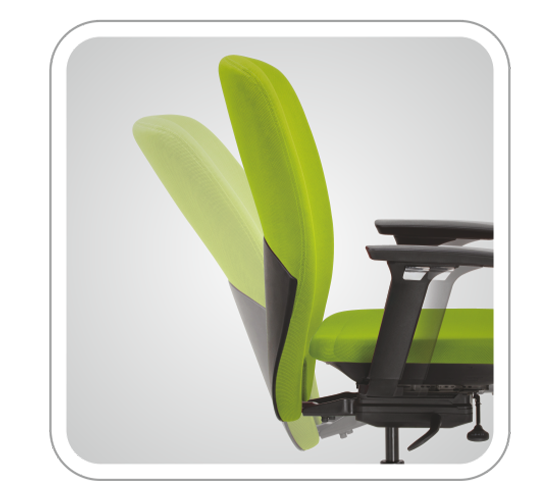
When adjusted correctly, armrests let your shoulders stay relaxed while you maintain a comfortable 90-degree elbow angle. With 2D armrests, which allow vertical and horizontal movement of the armpads, you can fine-tune the height and distance from your body so your forearms are supported exactly where you naturally place them, instead of having to reach or shrug. 3D armrests go a step further by adding a swivel function, allowing you to angle the armpads in or out. This small rotation helps your wrists and forearms stay in line with your keyboard or mouse, reducing twist in the forearm and keeping your shoulders in an even more neutral, relaxed position.
Armrest use varies throughout your day. During intensive typing, your arms might float freely, using armrests only during pauses. This intermittent support provides crucial rest breaks for shoulder and neck muscles. During phone calls or thinking moments, full armrest support helps maintain relaxed posture.
Width adjustment matters too, especially for different body types. Armrests positioned too wide force shoulder abduction; too narrow creates cramping. The ideal position keeps your arms naturally at your sides, neither squeezed nor stretched. Some tasks benefit from swiveling armrests that adapt to varied activities, for example, reviewing documents, sketching ideas, or gesturing during video presentations.Adjustable Recline: Movement as Medicine
A good chair doesn’t lock you in place, it moves with you, letting your spine shift, reset, and stay supported throughout the day.
Your body craves movement, even during seated work. Locking yourself into one "perfect" position causes muscle fatigue, joints stiffness, and slower circulation. Dynamic sitting through recline mechanisms introduces healthy micro-movements that keep your body engaged.
A quality recline mechanism supports various working positions. Upright for focused tasks, slightly reclined for computer work, and deeper recline for thinking or calls. This variety opens the angle between hips and trunk, reducing lower back pressure. The key lies in smooth transitions that maintain support throughout the range of motion.
Here's a table showing you different movement opportunities throughout your day:
|
Activity / Task |
Recommended Sitting Position |
|---|---|
|
Morning emails |
Gentle recline to ease into work |
|
Focused tasks |
Upright position for alertness |
|
Video calls |
Slight recline for relaxed presence |
|
Brainstorming |
Deep recline for expansive thinking |
|
End-of-day review |
Varying positions to prevent stiffness |
|
Adjusting the tension just right… The right ergonomic chair lets you tune tension to your body weight and movement style. Too much resistance restricts natural motion, whereas too little reduces stability. Look for chairs with an Automatic Weight Sensing Mechanism (AWSM). This mechanism helps set tension automatically for any body type, avoiding manual tweaks. Finally, align movement with tasks: gentle rocking for ideas, steady posture for focus, deeper recline for calls. When tension feels natural, long hours stay comfortable. |
Seat depth is one adjustment that can transform long-term comfort and lower-body support.
Seat depth might be the most overlooked ergonomic adjustment, yet it critically impacts comfort and circulation. Proper depth ensures full thigh support without pressing against your calves. The ideal gap between seat edge and knee back measures 2-3 finger widths.
When seat depth is too much, you'll either lose back support trying to avoid calf pressure or develop numbness from restricted circulation. A seat depth too shallow, and your thighs lack support, increasing pressure on your sitting bones. This is why seat adjustment becomes especially important during long work sessions when circulation issues compound.
Start by sitting fully back in your chair with proper lumbar contact. Check the space behind your knees: you should fit your clenched fist between seat edge and calf. This gap allows blood flow while providing maximum thigh support.
Different activities might benefit from slight depth variations. Leaning forward for detailed work? A slightly shorter depth prevents calf pressure. Reclining for calls? Fuller depth provides stability. The beauty of adjustable depth lies in this flexibility; your chair adapts as your posture shifts throughout the day.
|
Body Type |
Seat Depth Need |
Common Issue |
|---|---|---|
|
Tall/Long legs |
Maximum depth |
Insufficient thigh support |
|
Petite/Short legs |
Minimum depth |
Calf pressure, circulation cuts |
|
Average height |
Middle range |
Varies by posture |
|
Active sitters |
Variable depth |
Need flexibility for movement |
The five key adjustments to an ergonomic chair work together. Changing one affects the others. Start with seat height, then fine-tune lumbar support, armrests, recline, and seat depth. Test your setup for a full day and make small tweaks based on pressure or tension.
Revisit settings seasonally, as clothing, climate, and workspace conditions influence comfort. Use a 20-minute check-in to reset posture and make micro-adjustments. Create different presets for focused work, planning, and calls. And remember: no chair replaces movement…stand, stretch, and walk often. Wipro's Adapt series embraces this philosophy, offering intuitive adjustments that encourage natural movement while maintaining support.
Your chair plays a bigger role in your daily wellbeing than you may realise. When height, lumbar support, armrests, recline, and depth work together, they create a foundation that supports comfort, focus, and energy long after the workday ends. Even small adjustments can create meaningful ripple effects, improving how you feel both at your desk and beyond it.
Improving workplace wellness doesn’t require major changes, it just requires an understanding of how your chair can adapt to you. A few minutes of mindful setup can transform a home office, refresh a corporate workspace, or guide smarter seating choices for your team. Wipro's ergonomic chairs make this process intuitive, helping your workspace evolve with you and turning small setup choices into long-term wellbeing.
Your chair adjustments should evolve with your workday. Check settings weekly as your body adapts, and make micro-adjustments when switching between focused work and relaxed tasks. Seasonal changes and varying work demands also merit reassessment.
While all adjustments matter, proper lumbar support directly addresses lower back strain. Position it to match your spine's natural curve, typically at waist level. Combined with correct height adjustment, this creates the foundation for pain-free sitting.
No office chair, regardless of quality, replaces regular movement. Even with perfect adjustments, stand and stretch every hour. Good ergonomics supports you between movements, but your body needs variety to stay healthy and energised.
Your shoulders should feel relaxed, not hunched or elevated. With arms at your sides, elbows bent 90 degrees, armrests should gently support your forearms. You'll know they're right when neck and shoulder tension decreases.
Your body changes throughout the day. Morning stiffness differs from afternoon flexibility. Digestion affects posture preference. Make small adjustments as needed. Your comfort requirements at 9 am won't match those at 2 pm.